Does Instagram Notify Screenshots or Downloads? Every Case Explained
Contents
It's the question everyone quietly googles before saving someone's Story: will they find out?
The short answer: no, with exactly one exception. Below is every screenshot and download scenario on the platform, what the other person can and can't see, and where the real privacy leak actually is (hint: it isn't the screenshot).
Key takeaways
- Instagram does not notify anyone when you screenshot a Story, feed post, Reel, or profile picture.
- Instagram does not notify anyone when you download content with a tool.
- The only exception is screenshotting a view-once or vanish-mode photo or video inside a DM. That sends an alert.
- Watching a Story while logged in puts you on the poster's viewer list. That, not the screenshot, is what people actually see.
- Downloading by link involves no login, so your name isn't added to the poster's viewer list.
- Every "who viewed my profile" app is a scam; Instagram has never exposed visitor identities.
The full notification table
| Action | Does the other person get notified? |
|---|---|
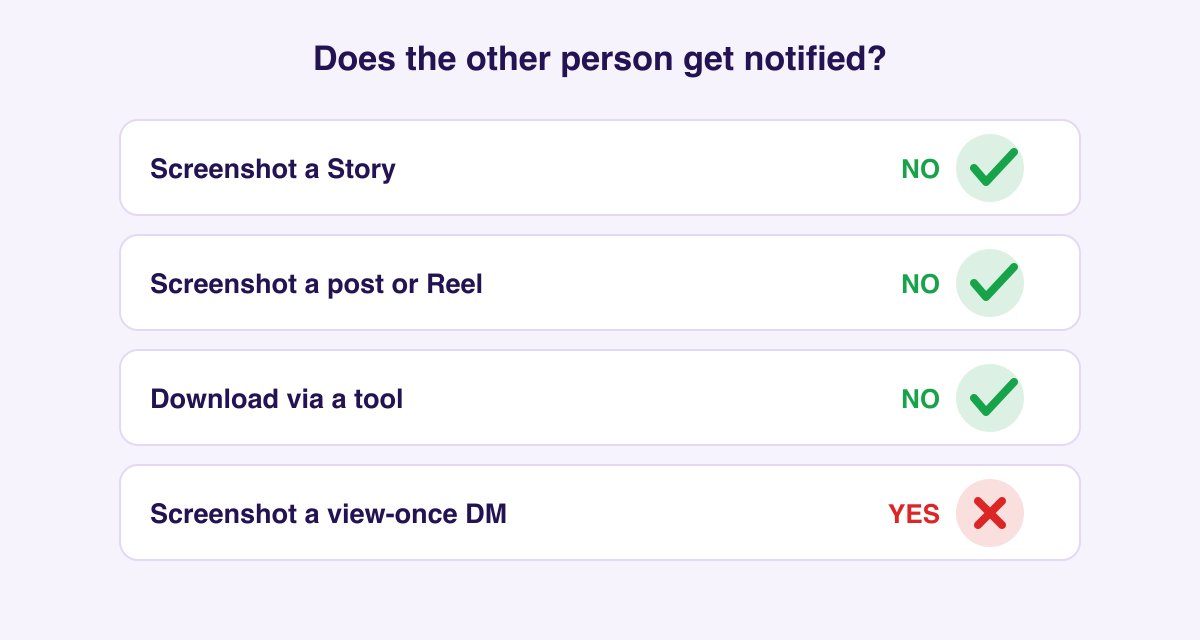
| Screenshotting a Story | No |
| Screenshotting a feed post or Reel | No |
| Screenshotting a profile or profile picture | No |
| Screen-recording a Story or Reel | No |
| Downloading a photo, video, Reel, or Story with a tool | No |
| Screenshotting a regular photo in DMs | No |
| Screenshotting a view-once / allow-replay photo or video in DMs | Yes, the one exception |
| Viewing a Story while logged in | No notification, but you appear in the viewer list |
Does Instagram notify when you screenshot a Story?
No. Instagram briefly tested Story-screenshot notifications in 2018 (users saw a camera-shutter icon next to screenshotting viewers) and removed the feature within months. It has never returned. In 2026, you can screenshot or screen-record any Story, from a close friend's to a celebrity's, and the poster sees nothing beyond your name in the ordinary viewer list (which appears because you viewed it, not because you captured it).
The persistent rumor survives because of the one DM exception below, and because Snapchat, where screenshot notifications are core to the product, trained everyone to assume the worst.
Does Instagram notify when you screenshot a post or Reel?
No, and there's a practical reason it never will: feed posts are public-by-design content that Instagram itself caches, embeds on websites, and serves through share links. There is no screenshot detection on posts, Reels, profiles, profile pictures, comments, or follower lists. The same goes for saving a post with Instagram's built-in bookmark: the creator can see aggregate save counts on a professional account, but never who saved it.
Does Instagram notify when you screenshot a DM?
This is where the single exception lives, so it's worth being precise:
- Regular DM content (texts, photos and videos sent from your gallery, shared posts, voice notes): screenshot freely, no notification.
- View-once or allow-replay media (photos and videos captured with the camera inside the chat and sent in disappearing mode): screenshotting or screen-recording these triggers an immediate notification badge in the conversation. Instagram treats them like Snapchat snaps.
- Vanish mode messages behave the same way: screenshots in vanish mode notify the other person.
If you're ever unsure which kind of media you're looking at: view-once photos open full-screen with a "1" or replay icon and disappear after viewing. Everything else in the chat is regular.
Story views are the real privacy leak, not screenshots
Instagram never tells a creator that their Story was screenshotted or downloaded. What it does show them is the viewer list: every logged-in account that opened the Story, visible for as long as the Story is live, plus in archive insights afterward.
So the order of operations matters. If you watch a Story in the app and then capture it, the capture stays invisible, but your view is already on the list from step one.
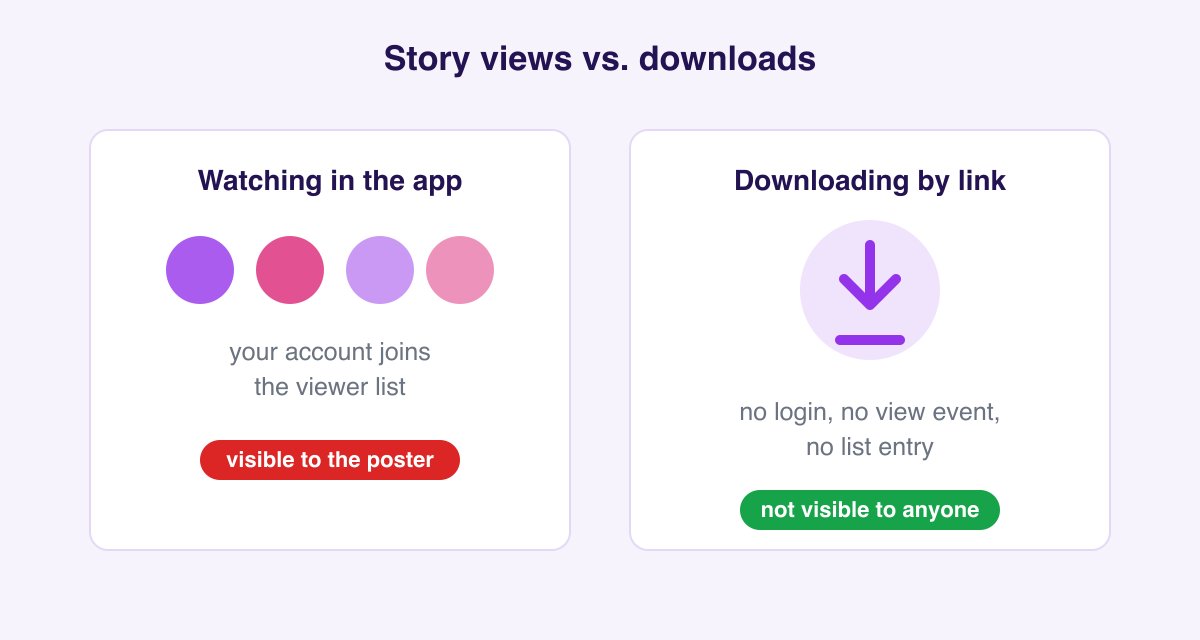
Downloading through the Instagram Story Downloader works differently: you paste the profile or Story link without opening the Story from your own account, so your name isn't added to the poster's viewer list. That's what "anonymous" means in this context: anonymous viewing and saving of public Stories, before they vanish at the 24-hour mark. If you only want to watch, not save, the anonymous Instagram Story viewer shows a public account's current Stories the same way, without your name in the viewer list. The same applies to saved Highlights, with one nuance: Highlights older than 24 hours don't show viewer lists to their owner at all, so even in-app viewing of old Highlights is invisible.
Does the order of the viewer list mean anything?
Since we're here: the viewer list's ordering is Instagram's most-asked mystery, and the honest answer is that Meta has never documented it. Observed behavior suggests the first ~50 views sort chronologically, after which the list reorders by an engagement signal: accounts that interact with you (profile visits, likes, DMs) drift toward the top. It is not proof that someone repeatedly rewatched your Story, and no feature shows rewatch counts to anyone.
Why everyone believes the myth: a short history
The confusion has real roots. In February 2018, Instagram ran a limited test that showed a camera-shutter icon beside anyone who screenshotted a Story. It generated enough backlash that Instagram pulled it within months and confirmed publicly that it was over. Disappearing DM photos, launched around the same time, kept their notification, and still have it today.
So for a few weeks in 2018, the fear was accurate. Every article written during that window is still floating around, which is why the myth refuses to die eight years later. The current state is simple: one notification, DMs only.
Blocked, restricted, and Close Friends
Three adjacent cases people ask about constantly:
- Close Friends Stories (green circle): a hand-picked audience, but identical notification rules: no screenshot alerts. The poster does see exactly who viewed, and the list is short, so viewing is more conspicuous socially even though the mechanics are the same.
- Restricted accounts: restriction affects comments and message requests, not story views or screenshots. If you can see the Story, viewing still adds you to the list.
- Blocked accounts: you can't see their content while logged in at all. And blocking is not a notification either. Instagram never tells someone they've been blocked; people infer it from the vanished profile.
What creators can actually see about you
Since the fear is usually social rather than technical, here's the honest inventory of what an account owner sees:
| They see | They don't see |
|---|---|
| Who viewed each Story (for 24h + archive) | Who screenshotted anything |
| Who liked, commented, shared to a Story | Who downloaded or saved (identities) |
| Aggregate save/share/reach counts | Who visited their profile |
| Follower list and who unfollowed | How many times you rewatched |
| DM screenshot alerts for view-once media | Screenshots of regular DMs |
The pattern: identities for actions you take publicly, numbers for everything else.
What about Threads?
Threads shares Instagram's account system, and the question follows people over. Threads sends no screenshot notifications of any kind. No Stories exist there, and posts are public text. Nothing you screenshot or save from Threads is reported to the author.
"Who viewed my profile" apps are scams, all of them
No app or website can show you who visited your profile, who screenshotted your posts, or who "stalks" you. Instagram's API has never exposed profile-visit identities to anyone, not even to the paid analytics tools agencies use. Apps claiming otherwise exist to harvest your login credentials or sell subscriptions against fabricated data. If you've used one: change your Instagram password and revoke the app under Settings → Security → Apps and websites.
What a professional (business/creator) account can see is aggregate, anonymous analytics: profile visits as a number, reach, save counts, share counts. Numbers, never names.
How anonymous downloading works in practice
- Copy the link to a Story, Reel, video, photo, or a full carousel album.
- Paste it on SaveFromInsta. No login means there's no "you" to appear in any list. The request isn't tied to your account at all.
- Download in the quality Instagram serves: MP4 for video, JPG for photos. The creator gets no notification, and your name isn't in their viewer list.
Being invisible doesn't make everything fair game
A quick ethical compass, since "can they see it?" and "should I do it?" are different questions:
- Personal archive? Saving a public post to watch offline is exactly what downloaders are for.
- Reposting? The content still belongs to its creator. Ask permission and give credit; an invisible download doesn't transfer any rights.
- Private accounts? Content behind a private profile is off-limits; our tools work with public posts only, by design.
- Disappearing DMs? Someone chose view-once mode for a reason. The notification exists to protect that choice, so respect it.
FAQ
If you unsend a message on Instagram, does the other person get notified? No notification is sent, but nothing prevents them from having already read it, and if their phone showed a push preview, unsending doesn't retract that. Unsend removes the message for both sides; it doesn't rewind time.
Can someone tell I viewed their profile repeatedly? No. Profile visits are never attributed to identities, only counted in aggregate for professional accounts.
Does screen-recording a Story notify the person? No, same as screenshots. Only view-once/vanish-mode DM media detects capture.
If I download a Story and the person later deletes it, do they know I have it? No. Deletion removes it from Instagram, not from anywhere it was already saved.
Do Close Friends stories notify screenshots? No. The green-circle audience is smaller, but the notification rules are identical to regular Stories.
Does Instagram notify when you screenshot a profile picture? No. And for saving one in full resolution, the profile picture downloader beats a screenshot on quality anyway.
Can businesses see who saved their post? They see the save count in insights: a number only, never the accounts behind it.