How to Repost a Story on Instagram (2026): Every Method
Contents
"Reposting a story" has quietly become several different actions on Instagram, and the right one depends on whose story it is and whether you were tagged. The good news for 2026 is that Instagram has loosened up: resharing that used to need a screenshot is now built in more often than not. The catch is that the native options still fail in a few predictable situations, and that is where knowing the workaround saves you.
This guide covers every case: resharing a story you were mentioned in, resharing a public story you were not tagged in, reposting your own old stories, adding a feed post to your story, and the separate Reposts feature for your grid. It also covers the parts most guides skip, like the repost limit that can quietly hide you from Explore, and what to do when the button you need simply is not there.
Key takeaways
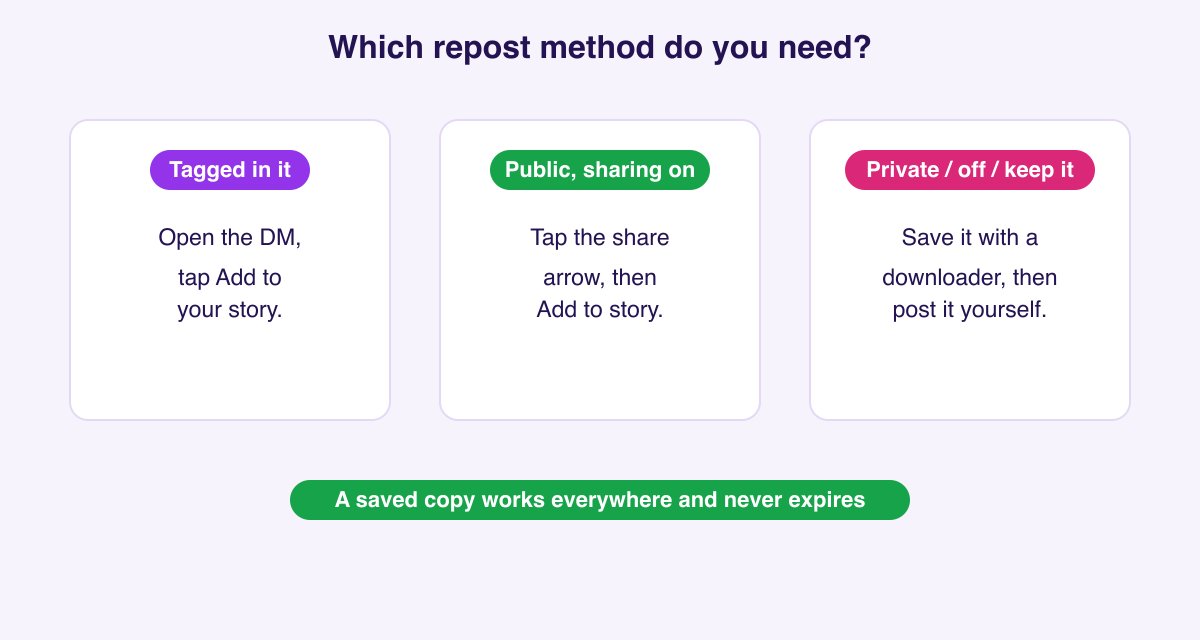
- Tagged in a story? You get a DM with an Add to your story button. Two taps and it is reshared, with a credit sticker.
- Not tagged, but the story is public? On updated apps you can now reshare it natively: open the story, tap the share arrow, and look for Add to story. The creator is notified and viewers can tap through to the original.
- When native resharing is missing (private account, creator turned off sharing, you want a permanent copy, or you want it on your feed), save the story first, then post it yourself. That is where a downloader replaces the old screenshot trick.
- Reposts (feed) is a separate feature from resharing a story. It sends public reels and posts to your own grid, under a Reposts tab.
- Watch the limit: going over about 10 reposts in a rolling 30-day window can get your account left out of Explore and Reels recommendations.
- Always credit the creator, and get permission before reposting anything commercially.
What "reposting a story" means on Instagram in 2026
Three different things hide under the same phrase, so it is worth separating them before the steps:
- Resharing a story to your own story. This is what most people mean. It puts someone's story (or your own) back into the 24-hour Stories feed as a card that links to the original.
- The Reposts feature (feed). Launched in 2025, this reshares a public reel or feed post to your grid, where it lives under a dedicated Reposts tab on your profile. It is for posts and reels, not stories.
- Saving and re-posting. Downloading a story or post and uploading it yourself, which is the fallback for anything the first two cannot do.
The rest of this guide walks through each, starting with the most common.
How to repost a story you were tagged in
When someone mentions your @username in their story, this is the quickest reshare on the platform.
- Open the direct message Instagram sends you, which reads "X mentioned you in their story." The mention lands under the paper plane icon.
- Tap Add to your story below the story preview.
- The story opens in the editor with a sticker crediting the original account. Reposition or resize it, add your own text or stickers, then tap Your story.
The credit sticker is added automatically and links back to the original poster. If the Add to your story option is missing on a mention, the other account is private or has turned off resharing of their mentions, and there is nothing you can change from your side.
How to repost a public story you were not tagged in
This is the case that changed. For years the answer was "you cannot, take a screenshot." On current Instagram versions, resharing a public story you were not tagged in is increasingly built in.
- Make sure your app is updated to the latest version.
- Open the public story you want to share.
- Tap the share arrow (the paper plane) at the bottom of the story.
- Look for Add to story. If it is there, tap it, edit if you like, and post.
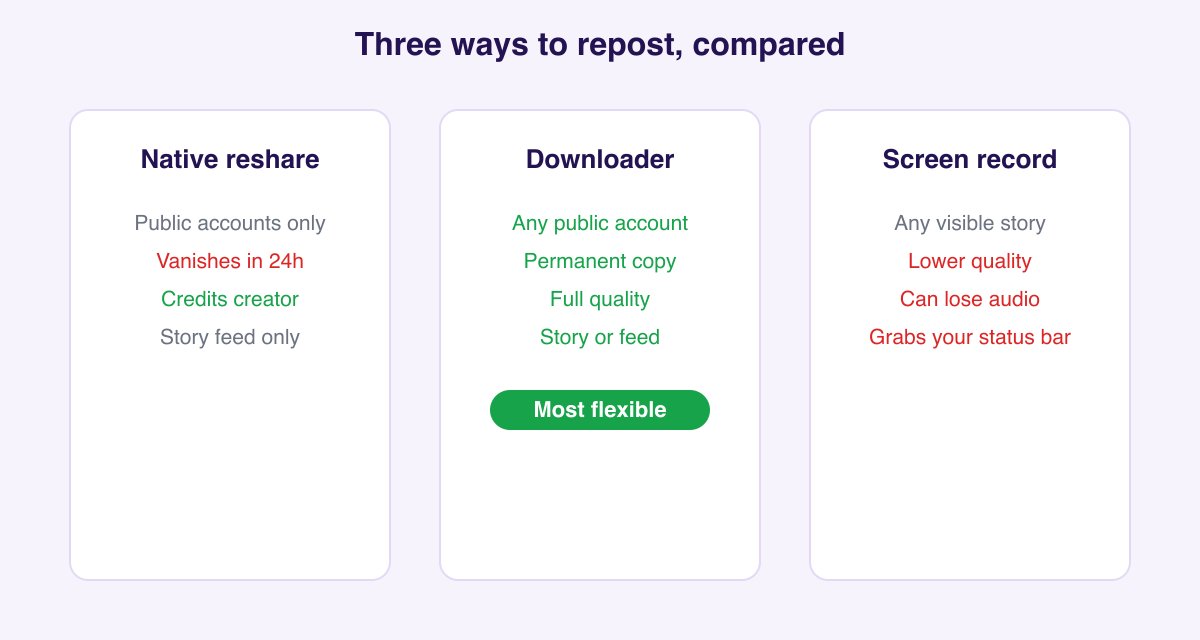
When it works, the reshared story credits the original account and lets your viewers tap through to it, and the creator is notified that you shared their story. Because this is a gradual rollout tied to app version, account type, and region, you may not see the option on every story or every account yet. When you do not, the next section is your reliable path.
When you cannot repost natively, and how to do it anyway
Native resharing quietly stops working in four common situations:
- The account is private (its content cannot leave the account).
- The creator turned off resharing in their sharing and reuse settings.
- You want a permanent copy, because a native reshare disappears when the original story expires in 24 hours.
- You want it on your feed or camera roll, not just your story.
In all four, the move is the same: save the story first, then post it yourself. A screen recording technically works, but it grabs your status bar, drops quality, and on iPhone can mute the audio. A cleaner copy comes from pasting the story link into the Instagram Story Downloader, which saves the original photo or video at full quality with no watermark. From there you can add it to a new story with an @mention sticker crediting the original account, drop it into a feed post, or keep it as a file. If the story is part of a Highlight, the Highlights Downloader pulls the whole set.
One reassurance: saving a public story by link is anonymous. It does not add you to the poster's viewer list and sends no notification, which we cover in does Instagram notify screenshots or downloads.
How to repost your own old stories
Your own expired stories live in your private Archive, and you can bring them back any time.
- Open your profile, tap the menu (three lines), then Archive, and switch the dropdown to Stories archive.
- Open the story you want.
- Use the share icon to post it again as a new story, or tap Highlight to keep it on your profile permanently.
A reshared story posts as brand new, with today's date and a fresh 24 hours, and goes to your current followers. For the full walkthrough of the Archive, including turning it on if it is empty, see how to unarchive a story on Instagram.
How to add a feed post or reel to your story
Resharing a normal feed post or reel to your story is the most common everyday repost:
- Open the post or reel.
- Tap the paper plane (share) icon below it.
- Choose Add post to your story (or Add reel to your story).
- The post appears as a tappable card in the story editor. Resize it, add a comment or sticker, then share.
Anyone who taps the card lands on the original post, so credit is automatic. If the option does not appear, the account is private or the creator disabled resharing to stories.
How to repost a reel or post to your feed (the Reposts feature)
Separate from stories, Instagram's Reposts feature sends a public reel or feed post to your own grid.
- Open the public reel or post.
- Tap the share arrow, then choose Repost.
- Add an optional note. The repost appears under a dedicated Reposts tab on your profile, credited to the original creator, and can surface to your followers.
This is the feature people conflate with resharing a story. Use Reposts for reels and feed posts you want on your grid, and the story methods above for the 24-hour Stories feed.
Crediting, permission, and copyright
Resharing public content so your followers can enjoy it is normal and usually welcomed. The line to watch is ownership. Reposting someone's photo or video without credit, cropping out their handle, or implying you made it can breach both etiquette and copyright. Keep the credit visible, tag the original account, and for anything commercial (an ad, a paid promotion, reselling) get explicit permission first. A quick "mind if I share this with credit?" almost always gets a yes.
The repost limit and staying in Instagram's good graces
Here is a rule almost no guide mentions: reposting too much can hurt your reach. Accounts that exceed roughly 10 reposts in a rolling 30-day window can be left out of Explore and Reels recommendations, because Instagram prioritizes original content in those surfaces. Reposting is fine in moderation, but if your account leans heavily on other people's content, space it out and mix in original posts. Adding your own context, a poll, or a reaction to a reshare also reads as more original than a bare repost.
Repost settings: turning resharing on or off
You control whether others can reshare your content, and you can check whether an account allows it before you try.
- Your own controls: Settings, then Sharing and reuse (also labeled Story sharing in some versions). Here you can allow or block others from resharing your stories, posts, and reels.
- From the reposter's side: if you cannot reshare someone's content, they have turned these off, and that is their choice to respect.
Troubleshooting: why "Add to story" is missing
If the reshare option will not appear, run through these in order:
- Update the app. Native story resharing rolled out gradually, and older versions do not have it.
- The account is private. Private content cannot be reshared at all.
- The creator disabled resharing. Check whether other people are resharing them; if nobody can, it is switched off.
- The story already expired. You can only reshare a live story or one saved to a Highlight.
- Region or account type. Some features reach business accounts or certain regions later.
When the option is genuinely unavailable, fall back to saving and re-posting, as covered above.
FAQ
Can I repost someone's Instagram story if they did not tag me? Often yes now. On updated apps, open the public story, tap the share arrow, and look for Add to story. If it is missing (private account, resharing turned off, or the feature has not reached you), save the story with the Story Downloader and post it yourself with credit.
Why is "Add to Story" missing even though I am tagged? The account is private or has turned off resharing of their mentions. Ask them to send the story to you directly instead.
Does the original poster get notified when I repost their story? For a mention reshare, yes, because you are tagging them back. For a native reshare of a public story, the creator is notified. If you save and re-post a public story yourself, there is no automatic notification, though a visible credit sticker means they may see it.
Is it illegal to repost someone's story without permission? Reposting public content with credit for non-commercial sharing is generally fine. Using someone's content commercially, or passing it off as your own, can breach copyright and Instagram's terms. Ask first for anything commercial.
What happens if I go over the 10-repost threshold? Instagram can stop recommending your account in Explore and Reels for a period, because those surfaces favor original content. Space out reposts and mix in your own posts.
Can I repost an expired story to my Highlights? Yes, if it is your own story. Open it in your Stories archive and tap Highlight. You cannot highlight someone else's story unless they shared it to you.
How do I enable or disable story reposting on my account? Settings, then Sharing and reuse (or Story sharing). Toggle whether others can reshare your stories, posts, and reels.
How do I repost a story to my feed instead of my story? Instagram does not move a story straight to the grid. Save the story photo or video first with the Story Downloader, then create a normal feed post from that file.
Can I schedule reposted stories in advance? Not through the app. Scheduling stories requires a third-party social tool, and even then you supply the media file, which is another reason to save the story first.
Why did my reshared story lose its music? Licensed audio does not always carry through a reshare, especially across regions, so the original poster's music sticker can drop out. It is a licensing limitation on Instagram's end, not something you can fix.
For more on working with stories, see our guides on how to unarchive a story and how to edit an Instagram story.