How to Unarchive a Story on Instagram (2026): Every Method
Contents
Here is the thing almost every guide buries: Instagram has no "unarchive" button for Stories. When you archive a post you can put it straight back on your grid, but a Story that has already expired cannot be restored to its original 24-hour window. What you can do is find it in your private Archive and bring it back a different way, either as a new Story, as a permanent Highlight, or as a file you save for good.
This guide covers all of it: where the Archive actually lives in the 2026 app, the three ways to resurface an old Story, the difference between archiving a post and a Story, how to turn auto-archiving on or off, and the confusion that trips everyone up, which is that archived, deleted, and Memories are three different things.
Quick answer
To bring back an archived Instagram Story: open your profile, tap the menu (the three lines), tap Archive, and switch the dropdown to Stories archive. Open the Story you want, then either tap Highlight to keep it on your profile, use the share icon to post it again as a new Story, or save it to your device to keep a permanent copy. There is no button that makes an expired Story "live" again for another 24 hours.
What archiving actually does to your Story
When a Story disappears after 24 hours, Instagram automatically tucks a copy into your Story Archive. This happens silently and by default. The archived copy is private, visible only to you, and it keeps the Story's original stickers, music, and the list of who viewed it. Nothing is posted, nobody is notified, and it never shows on your profile unless you choose to bring it back.
That is why so many people have years of Stories sitting in an Archive they have never opened. Archiving is not something you did on purpose. It is the default, and it is the reason "how to unarchive a Story" is really "how do I find and reuse the copy Instagram already saved for me."
Why Instagram has no true "unarchive" for Stories
A Story is designed to be temporary. Once its 24 hours are up, that specific instance is over, and Instagram will not put it back into the live Stories bar as if it never expired. This is different from a feed post, which you can archive to hide it and then unarchive to drop it right back into its original spot on your grid.
So for Stories, "unarchive" means one of three things, and picking the right one depends on what you actually want:
- You want it on your profile for people to find again. Add it to a Highlight.
- You want it back in the Stories feed for 24 hours. Reshare it as a new Story.
- You want to keep it forever, off Instagram. Download it.
The next sections cover each.
How to find your archived Stories
The path in the 2026 app:
- Open your profile.
- Tap the menu icon (three horizontal lines) in the top corner.
- Tap Archive.
- It usually opens on the Stories Archive. If it shows posts, tap the dropdown at the top and choose Stories archive.
Your expired Stories appear newest first. Tap the calendar or map icon to browse by date or by where you posted from, which is genuinely useful when you are hunting for one specific old Story.
A note on desktop: you effectively cannot manage the Story Archive on Instagram's website. Archiving, browsing, resharing, and highlighting are all mobile-app features. If you only have a computer, the one thing that works is downloading a Story by link, covered below.
Method 1: Reshare an archived Story as a new Story
This puts the Story back in the 24-hour feed.
On iPhone and Android:
- Open your Stories archive and tap the Story you want.
- Tap the share icon (the paper plane) at the bottom.
- Choose Share as story (or "Add to story").
- Edit it if you like, then tap Your story.
Set your expectations here, because this is where people get confused. The reshared Story is a brand new Story. It carries today's date, it runs for its own fresh 24 hours, it goes out to your current followers rather than the ones who saw it the first time, and its original view count does not carry over. It is a fresh post that happens to reuse old content, not a revival of the original.
Method 2: Add an archived Story to a Highlight
This is the closest thing to a real "unarchive," because it puts the Story back on your profile permanently.
- Open the archived Story.
- Tap the Highlight button at the bottom.
- Choose an existing Highlight or create a new one and name it.
The Story now lives under your bio, in that Highlight, for anyone who visits your profile to tap through. It stays there until you remove it, and adding it does not post a new Story to the feed or notify anyone. If you want to pull an entire Highlight down to your phone later, the Highlights Downloader saves every clip in the collection at once.
Method 3: Download it to keep a permanent copy
Here is the part every competing guide underplays, and it matters more than the other two methods combined. The Story Archive is Instagram's copy, on Instagram's servers, under Instagram's rules. It is not a backup you control. If your account is locked, hacked, disabled, or deleted, or if archiving was switched off when you posted, or if Instagram changes how the feature works, those Stories are gone and no method above will bring them back.
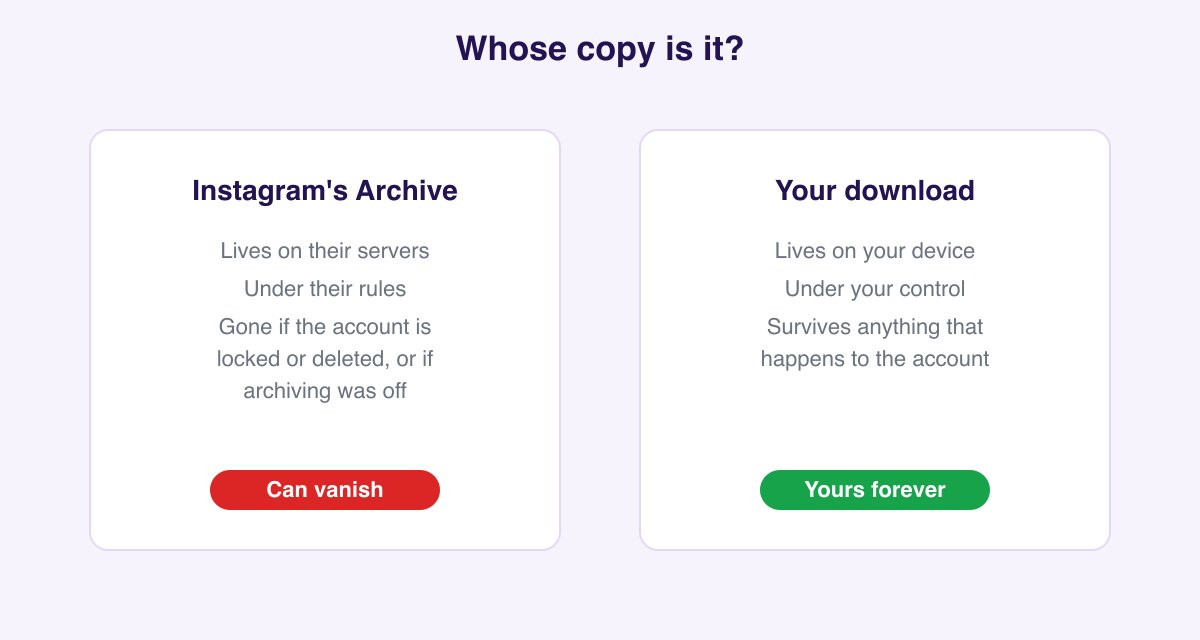
If a Story genuinely matters, the only way to truly keep it is to get it off the platform and onto your own device:
- From your Archive: open the Story and use the share icon to save the photo or video to your camera roll where the option is available.
- By link: paste the Story's link into the Instagram Story Downloader to save the original photo or video at full quality, with no watermark. This is the route that also works on desktop and for public Stories that are not in your own Archive.
Once it is in your camera roll and your own cloud backup, no app setting, account issue, or platform change can take it away. Saving by link is also anonymous and sends no notification, which we explain in does Instagram notify screenshots or downloads.
How to unarchive a post instead (and why posts are different)
A lot of the confusion around this topic is really a mix-up between two separate features. Archiving a post hides it from your grid without deleting it, and it is a manual choice you make per post. Archiving a Story happens automatically when it expires. They behave differently when you bring them back:
| Archived post | Archived Story | |
|---|---|---|
| How it got archived | You archived it manually | Auto-saved when it expired |
| How to bring it back | Show on Profile (true unarchive) | Reshare as new, or Highlight |
| Where it returns | Its original grid spot | As a new Story, or a Highlight |
| Keeps original date and likes | Yes | No, a reshare resets both |
| Anyone notified | No | No |
To unarchive a post: profile, menu, Archive, switch the dropdown to Posts archive, open the post, tap the three dots, and choose Show on profile (some versions label it "Unarchive"). The post slides back into its original position on your grid with its date, likes, and comments intact.
How to turn Story auto-archiving on or off
If your Archive is empty, auto-archiving is switched off.
- Open Settings from the profile menu.
- Go to Archiving and downloading (older app versions place this under Privacy or Story settings).
- Turn on Save story to archive.
From now on, every Story you post is saved automatically after it expires. There is no real downside to leaving this on. The Archive is private, it does not count against any storage limit, and it is the only safety net Instagram gives you for expired Stories. The one catch is that the setting is not retroactive: turning it on today does nothing for Stories that already expired while it was off.
Troubleshooting: my archive is empty or a Story is missing
If you cannot find a Story you expected, one of these is almost always the reason:
- Archiving was off when you posted it. The setting is off, or it was off during that period, so nothing was saved. This is the most common cause, and it is unfixable after the fact.
- The Story predates the feature or predates your archiving being enabled.
- You are on the wrong tab. Make sure the dropdown says Stories archive, not Posts archive.
- You switched accounts or devices. The Archive is tied to the specific account, so check you are logged into the right one.
- The Story was deleted, not archived. That is a different situation, covered next.
Archived vs deleted vs Memories: what is recoverable
These three get mixed up constantly, so here is the clean version:
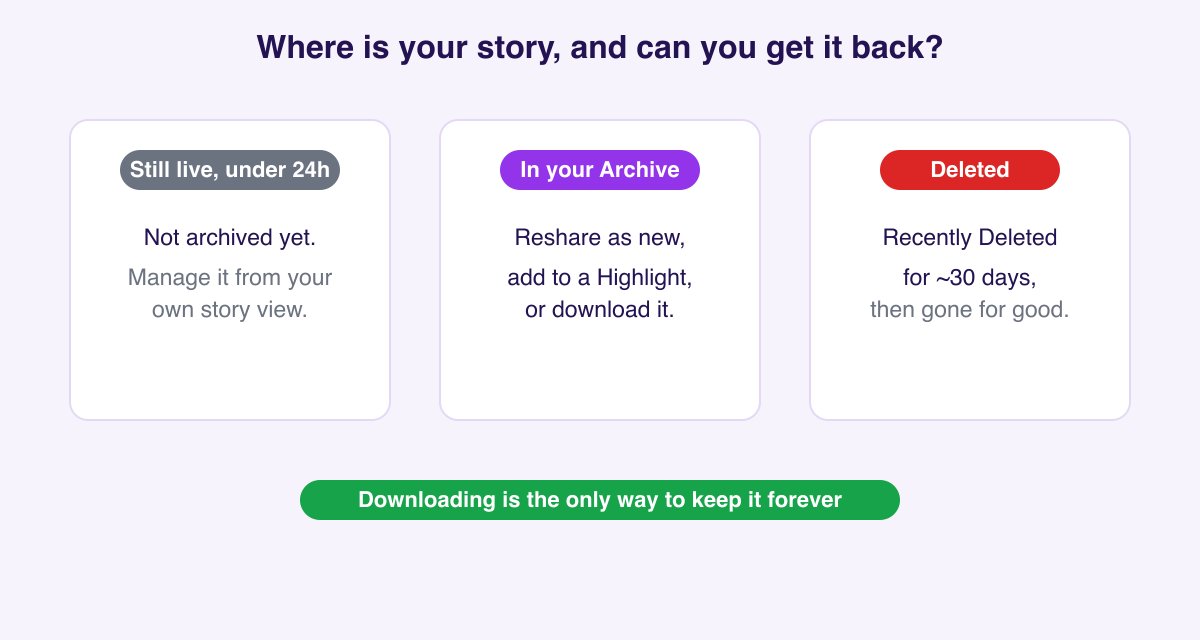
- Archived: expired Stories auto-saved to your private Archive. Recoverable any time using the methods above.
- Deleted: a Story you actively deleted. It goes to Recently Deleted for about 30 days, where you can restore it. After that window it is generally gone for good and is not in your Archive.
- Memories / On This Day: Instagram sometimes resurfaces old Stories as a "Memory" prompt to reshare. That is a separate feature from the Archive, not a place your Stories are stored.
The practical takeaway ties back to Method 3: an archived Story feels safe, but a deleted-and-expired one often is not recoverable at all. If losing a Story would genuinely bother you, download it while you still can rather than trusting it to any of these on-platform surfaces.
Can you unarchive or see someone else's old Stories?
No. Your Archive contains only your own Stories, and there is no way to browse another person's archived Stories. The only old Stories of someone else's you can see are the ones they chose to save to a public Highlight. Any app or website promising access to a private account's archived Stories is not telling the truth, and you should never hand your Instagram password to one. If a public Story or Highlight is what you are after, save it the honest way with the Story Downloader.
For the flip side of this topic, reusing Stories inside the app, see our guides on how to repost a Story on Instagram and how to edit an Instagram Story.
FAQ
Does unarchiving a Story notify my followers or show as new? Resharing an archived Story posts it as a brand new Story with today's date, visible to your current followers. Adding one to a Highlight does not post anything to the feed and notifies no one. Neither action tells anyone it came from your Archive.
Are archived Stories visible to my followers or anyone else? No. Your Story Archive is completely private. Others see an old Story only if you resurface it into a Highlight or reshare it.
Can I unarchive a Story while it is still within 24 hours? If the Story is still live, it has not been archived yet, so there is nothing to unarchive. You manage a live Story directly from your own Story view.
How long do archived Stories stay saved? Indefinitely, as long as auto-archiving stays on and your account remains active. They do not expire from the Archive.
What is the difference between deleting and archiving a Story? Archiving happens automatically when a Story expires and keeps a private copy forever. Deleting is a deliberate action that sends the Story to Recently Deleted for about 30 days, after which it is generally unrecoverable.
How do I unarchive a post I accidentally archived? Profile, menu, Archive, switch to Posts archive, open the post, tap the three dots, and choose Show on profile. It returns to its original grid spot.
Can I add an archived Story to a Highlight without it showing as new? Yes. Adding a Story to a Highlight never posts a new Story to the feed and sends no notification.
Why is my Stories archive empty? Auto-archiving is switched off, or it was off when those Stories expired. The setting is not retroactive, so it only saves Stories posted from the moment you enable it.
Can I recover a deleted Instagram Story? Only within the roughly 30-day Recently Deleted window, found in Settings under Account or Your activity. After that, a deleted Story is usually gone and is not in your Archive.
Can I unarchive a Story on a computer or desktop? No. The Story Archive is mobile-app only. The one thing that works on desktop is downloading a public Story by link with the Story Downloader.
Can I see someone else's archived Stories? No. You can only view another person's old Stories if they saved them to a public Highlight. No legitimate tool exposes a private account's archive.