Instagram Video Download in MP4: Why Quality Drops and How to Get Full HD
Contents
Nothing is more deflating than saving a video and discovering it looks worse than it did in the app: soft edges, smeared text, blocky motion. The video didn't degrade by magic; the method you used simply grabbed the wrong file.
Here's the full picture: how Instagram stores and serves video, why downloads come out blurry, how to check what you actually got, and how to consistently save the sharpest MP4 the platform has.
Key takeaways
- Instagram stores every video at several resolutions. Blurry downloads happen when a tool grabs a low rung of that ladder instead of the top one.
- 1080p is Instagram's ceiling: 1080×1350 for feed videos, 1080×1920 for Reels. No 4K exists on the platform, whatever a site advertises.
- Verify what you got in ten seconds: iPhone Photos info panel, Android file Details, Windows Properties, macOS QuickTime Inspector. Look for 1080 on the long edge.
- Never re-convert a downloaded file. Every pass through a converter stacks new compression on Instagram's.
- Instagram delivers H.264/AAC at roughly 2–5 Mbps, versus 20–50 Mbps from your phone's camera. That gap is the compression you can see.
- Screen recording always loses: lower resolution, dropped frames, baked-in interface, and often no sound.
Instagram serves many versions of every video
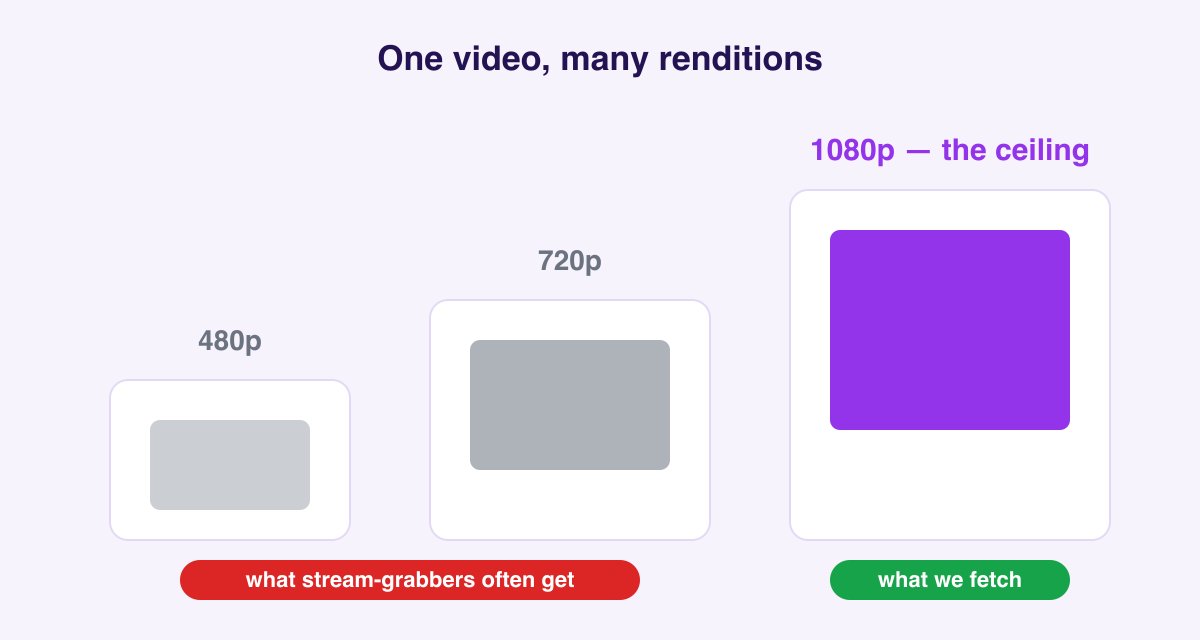
When someone uploads a video, Instagram transcodes it into a ladder of renditions: the same clip at multiple resolutions and bitrates. Your phone on hotel Wi-Fi gets a lightweight 480p stream; a desktop on fiber gets 1080p. That's adaptive streaming, and it's great for playback.
It's terrible for downloading, though, because naive tools just grab whatever rendition happens to be playing, often a mid-ladder stream chosen for a weak connection. That's where most "blurry download" complaints come from.
What resolution does Instagram actually serve?
| Content type | Aspect ratio | Top rendition | Frame rate |
|---|---|---|---|
| Feed videos | 4:5 | 1080×1350 | up to 60fps kept if uploaded |
| Reels | 9:16 | 1080×1920 | 30 or 60fps |
| Stories | 9:16 | 1080×1920 | 30fps typical |
| Carousel videos | matches post | 1080p class | 30fps typical |
| Old IGTV uploads | varies | 1080p or original | varies |
Two things follow from this table. First, 1080p is the ceiling. Instagram does not serve 4K to anyone, ever, so "4K Instagram downloader" claims are upscaling or marketing. Second, anything you download at 640×800 or 480×854 is a mid-ladder rendition: the full-quality file existed, and the tool just didn't fetch it.
Why Instagram compresses video so hard
Every upload passes through Instagram's transcoder, which optimizes for delivery cost and playback smoothness, not fidelity. In practice that means H.264 in an MP4 container at surprisingly low bitrates, a few Mbps for 1080p, where your phone's camera records the same resolution at 3–10× that. Fine detail (grass, confetti, small text) is the first casualty.
This matters for downloaders in one specific way: the in-app version is the best version that exists. A good download matches it exactly; nothing can exceed it. If a video already looks soft in the app, no tool can sharpen it.
The Data Saver trap
Both Instagram's own data saver setting and a congested mobile connection push the player down the rendition ladder, and any tool that captures "the playing stream" inherits that downgrade. This is why the same video can download blurry on mobile data at noon and crisp on Wi-Fi at midnight with a stream-capturing tool. A downloader that requests the top rendition directly, like ours, sidesteps the whole problem: the connection affects how long the download takes, never which file you get.
How to download the Full HD MP4
- Copy the video's link: share arrow → Copy Link in the app, or the address-bar URL on desktop.
- Paste it into the Instagram Video Downloader. It requests the top rendition on Instagram's ladder, not the bandwidth-throttled stream, and returns it as a standard MP4.
- Download. No watermark, original audio, plays on any device without conversion.
Reels have their own tuned tool at the Instagram Reels Downloader, and multi-video album posts download all at once, every slide in its native quality, through the Carousel Downloader.
How to check what resolution you actually got
Trust, but verify. It takes ten seconds:
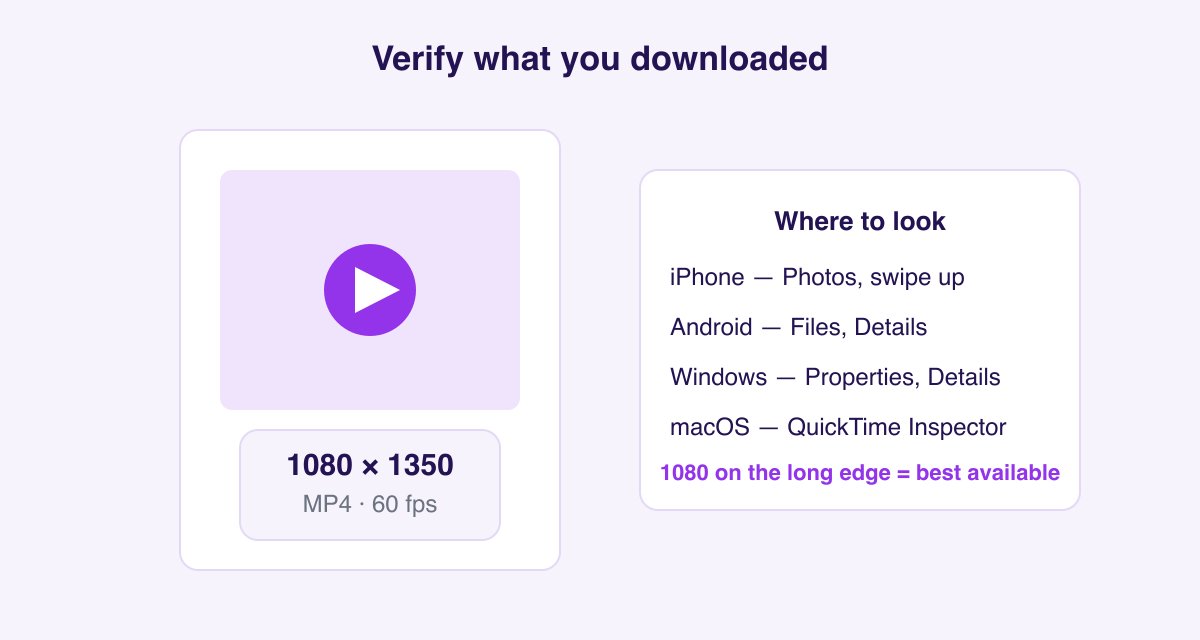
- iPhone: open the video in Photos, swipe up (or tap the ⓘ button) and the info panel shows resolution and frame rate.
- Android: in Files or your gallery, long-press the video → Details/Info.
- Windows: right-click the MP4 → Properties → Details tab.
- macOS: open in QuickTime → Window → Show Movie Inspector (⌘I).
If you see 1080 on the long edge, you have the best file Instagram serves. If you see 480 or 640, the tool you used grabbed a low rung. Try again with a downloader that requests the source rendition.
Why MP4 is the format you want
MP4 with H.264 video and AAC audio is what Instagram itself delivers, and it's the most universally compatible container there is: iPhone camera roll, Android gallery, Windows, macOS, every editor from CapCut to Premiere. A downloader that hands you anything else has re-encoded the file, and re-encoding always costs quality.
That's also the golden rule for keeping downloads sharp: never convert an already-downloaded file unless you truly need a different format. Each pass through a converter stacks compression on top of Instagram's own.
Blurry anyway? Run down this list
- The upload was soft to begin with. Filmed in low light, uploaded over mobile data, or recorded at 720p: Instagram can't add detail that never arrived. Compare against the in-app version at full brightness.
- You screen-recorded it. Screen captures inherit your display resolution, your frame drops, and your notification banners. A direct MP4 download skips all of it.
- You downloaded from a repost account. Meme pages upload compressed copies of compressed copies. Find the original creator's post and save from the source.
- WhatsApp or email crushed it afterward. Messaging apps aggressively recompress video attachments. Move files via AirDrop, Google Drive, or a cable to keep them intact.
- Your player is upscaling. A 1080×1350 video fullscreened on a 1440p monitor is being stretched by ~30%. That's display scaling, not file quality.
Screen recording vs downloading, compared honestly
People keep screen recording because it feels simpler. Here's what the two methods actually produce from the same source video:
| Screen recording | Direct download | |
|---|---|---|
| Resolution | Your screen's, cropped to the app window | The source rendition (up to 1080p) |
| Frame rate | Drops frames under load | Exact source frame rate |
| Audio | Can be muted by iOS; picks up notifications | Original AAC track |
| Interface | Status bar, buttons, progress ring baked in | Clean frame |
| File size | Larger, for worse quality | Smaller, better quality |
| Time | Real-time; a 60s video takes 60s | A couple of seconds |
The gap isn't subtle. A screen recording re-encodes an already-compressed stream while displaying it, which is two generations of loss plus whatever your screen was doing at the time.
Codecs and bitrate: what you actually receive
For the technically curious, and because "why is my 1080p file only 8 MB?" is a real question:
- Video codec: H.264 (AVC), High profile. Universally compatible; it's why the MP4 plays everywhere without conversion.
- Audio codec: AAC, typically 128 kbps stereo.
- Container: MP4 with the
moovatom positioned for progressive playback. - Bitrate: roughly 2–5 Mbps for 1080p. Your phone's camera records the same resolution at 20–50 Mbps, which is why an original file is many times larger than the Instagram version.
That bitrate gap is the compression, and it's applied server-side at upload. It's also why re-encoding a download is counterproductive: you'd be compressing something already compressed 10×.
When a downloaded video won't play
Rare, but the fixes are quick:
- Silent playback in a browser tab. The tab is muted, or the page auto-muted it. Save the file and open it in a real player.
- Green or garbled frames. An incomplete download. Delete and re-download; interrupted transfers produce a truncated MP4.
- "Unsupported format" on an older TV or car stereo. Those devices often want baseline-profile H.264. This is the one legitimate case for converting: HandBrake's Fast 1080p30 preset fixes it.
- No thumbnail in your gallery. The gallery hasn't indexed it yet. On Android, reopening the Files app or restarting usually triggers a media scan.
For creators: uploading so your video survives
The download side has a mirror image most downloader blogs never mention: what you upload determines what anyone can ever save:
- In Instagram: Settings → Media quality → Upload at highest quality (off by default on many accounts).
- Upload on Wi-Fi; Instagram uploads a smaller file when it detects a weak connection.
- Record at 1080p/30 or 60. 4K sources get downscaled anyway, but a clean 1080p master gives the transcoder the easiest job.
- Avoid re-exporting through multiple apps before posting; every generation of compression compounds.
FAQ
Can I choose which resolution to download? The tool automatically fetches the highest rendition Instagram serves for that post, and there's no reason to want a lower one.
Can I get 1080p at 60fps? If the creator uploaded 60fps and Instagram kept it (common for Reels), the downloaded MP4 contains it. The frame rate is a property of the file, and the info-panel check above will show it.
Is 4K download possible from Instagram? No. 1080p is Instagram's delivery ceiling regardless of what was uploaded. Anything labeled 4K was upscaled after the fact.
Why did my video download at 720p? Either the upload itself was 720p (older phones, in-app camera in low light) or the post predates Instagram's 1080p pipeline. The downloader returns the best rendition that exists for that specific post.
Do photos work the same way? Yes. Photos have their own rendition ladder, and the Instagram Photo Downloader pulls the full-resolution JPG. Multi-photo posts go through the carousel tool.
Can I convert the MP4 to another format? You can (VLC and HandBrake are free), but do it only when something requires it, since every conversion re-compresses. For editing, every modern editor accepts Instagram's MP4 directly.
Is there a download limit? No. Paste as many links as you like, free, without an account.